Keywords: WinCIM Compuserve Information Manager 2.0 winsock winsock.dll
Summary:
This tech note will provide you with the step by step method of converting WinCIM 2.0 to work with Highway 101 (and a Winsock Stack for that matter).
Details:
- Start Compuserve's WinCIM normally, but do not try to connect yet.
- Click on the "Continue" button
- Click on "Session Settings…" from the "Special" menu
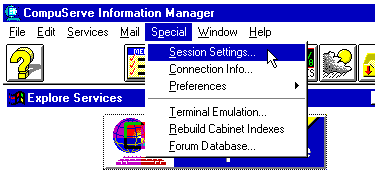
Figure 1: Selecting "Session Settings" from the "Special" menu
This will bring up a window as shown in Figure 2
Select "Internet" from the "Network" drop-down list box. This specifies that Compuserve will be communicating over the Internet, instead of a Compuserve dial-up line.
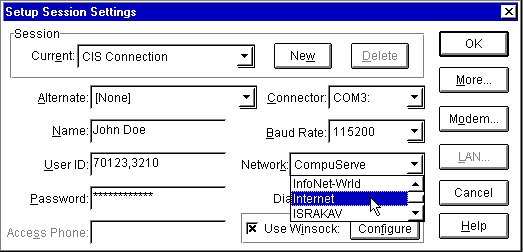
Figure 2: Selecting "Internet" as the Network to connect through
- Click on the "Use Winsock:" option at the bottom of the screen as seen in Figure 3. This will cause the Winsock stack to be loaded if it isn't resident already, and communications to be passed through the stack.
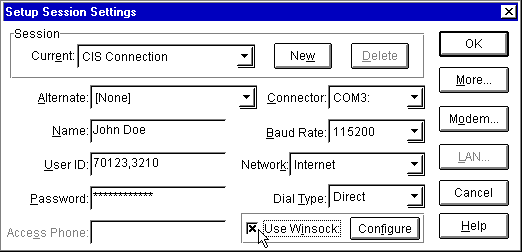
Figure 3: Selecting "Use Winsock" from the "Setup Session Settings" dialog box.
Compuserve's WinCIM is now ready to be accessed through an active Internet connection.
NOTES:
- You must first be connected to the Internet using your Winsock stack
- Compuserve is notoriously bad for having connection difficulties. This means that the user may have to retry connecting to Compuserve several times before the connection is finally established.
- WinCIM will often experience a "Connection Time Out" error, thus disconnecting
- If the user has not yet installed WinCIM, and wants to get it running and going over the Internet, make sure that they DO NOT INSTALL Compuserve's Winsock Stack! This will cause a great number of problems if they do install it first.