On some systems, when the display is set to 32-bit color mode, an overflow error to occurs on the initial setup screen update. To resolve this, drop the color depth on the end user's computer to 24-bit or lower color instead of 32-bit. After installation is complete, the end user may increase the color depth back to 32-bit color without problems.To change the color depth on most machines, perform the following steps:
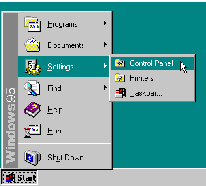
1. Click on the
Menu
2. Click on the Settings Menu
Figure 1: Displaying the Settings Sub-Menu 3. Select Control Panel icon
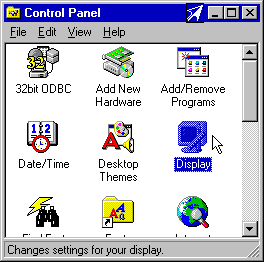
4. Double-click on the icon labeled Display
Figure 2: Selecting the Display Settings
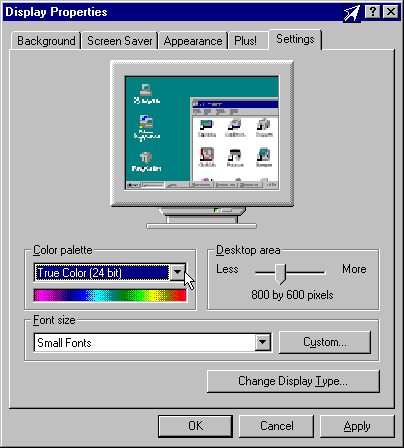
5. Select the Settings Tab.6. Locate the box labelled Color Palette. Drop it down and select a True Color (24-bit) or lower color depth.
Figure 3: Changing the Displayed Color Depth Important: Many display drivers add their own custom tabs to the Display control panel application. Be sure to ask the end user for the names of all the tabs that are displayed in this window. If there is anything strange such as "ATI" or "MGA Settings", chances are, you will need to adjust color depth here.instead of the Settings Tabs.7. Click the OK button to save your changes. With most display drivers, you will need to reboot your system before you can continue.