Summary:
This tech note will provide you with the step by step method of converting America Online's client software, Version 2.5 or 3.0 to work with Highway 101 (and a Winsock Stack for that matter).
Details:
- Start America Online normally, but do not try to connect yet.
- Click on the "Setup" button (as shown in figure 1)
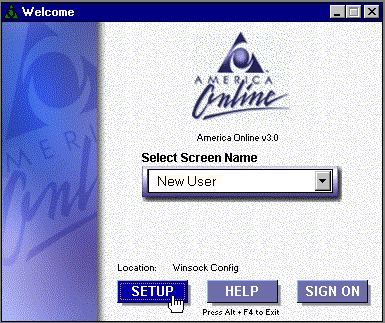
This will bring up a window as shown in Figure 2
- You will need to create what America Online calls a new
"Location". This is actually a new dialing profile which is where
you will make your changes.
America Online, by default, is set to use your modem to dial out. Highway 101 uses the Winsock stack to establish communications over a TCP/IP layer. In order to be able to use both your modem, and your winsock stack, you should create a new "location", rather than editing the existing one.
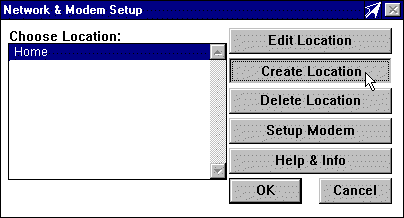
- Click on the "Create Location" button (this will bring up a new window as shown in Figure 3)
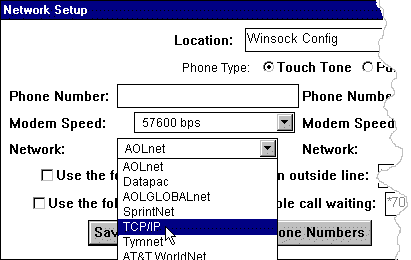
- You will need to modify the profile on the left side to reflect the following:
- Modem Speed: 57600 bps
- Network: TCP/IP
- Modify the profile on the right side as well. This will force AOL to connect through TCP/IP ONLY.
NOTES:
- You must first be connected to the Internet using your Winsock stack
- America Online is notoriously bad for having connection difficulties.
- If the user has not yet installed America Online, and wants to get it running and going over the Internet, make sure that they DO NOT INSTALL AOL's Winsock Stack! This will cause a great number of problems if they do install it first.