Highway 101 checks if Client for Microsoft Networks, TCP/IP protocol, and Dial-Up Adapter is installed. If the system reports that all three components are installed, then Highway will continue assuming that all foundational components are properly installed. This will not work properly under the following conditions:
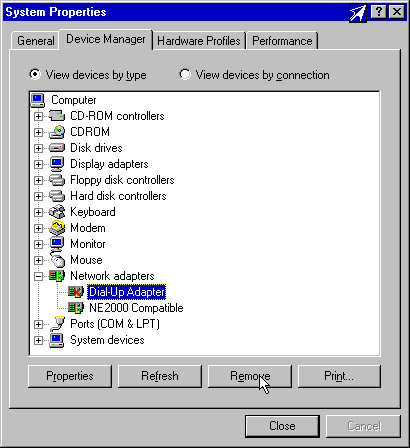
Resolving Issue #1: This can be resolved by removing the Dial-Up Adapter and re-installing Highway 101. To remove the Dial-Up Adapter, perform the following steps. For clarification, refer to the figure entitled "Typical Device Removal" below.
- The Dial-Up Adapter is installed but it is disabled. In this case, Windows reports that the adapter is properly installed, and there is currently no known way of detecting that the adapter is disabled.
- TCP/IP and the Dial-Up Adapter are installed, but they are not bound to each other.
- Go to the Start Menu, Settings, and Control Panel
- Double-Click on the "System" Icon
- Click on the "Device Manager" Tab
- Locate Dial-Up Adapter under the branch labeled "Network Adapters" Select this adapter by clicking on it once.
- Click on the Remove button (as shown in Figure 1)
- Click on OK to save your changes.
- You will need to reboot your system to finish removing the Adapter.
Resolving Issue #2: This may be resolved by going to the Network settings in control panel and manually adding the TCP/IP protocol. This is detailed in Steps #10-12 of Technical Note #1501 on this web site.
Figure 1: Typical Device Removal - Clicking on the "Remove" button Note: There may be other issues, unforeseen hardware issues present that caused the Dial-Up Adapter to be disabled in the first place. Be on the lookout for other errors cropping up when attempting to use Dial-Up networking on a system like this.